- Page d'accueil /
- Jeux vidéo /
- PC /
- Accessoires /
- Controllers /
- Flight Controls /
- Logitech G Pro Flight Instrument Panel
0 ratings






Numéro d'article:
60253792
Logitech G Pro Flight Instrument Panel
87% des répondants recommanderaient ceci à un ami
Numéro d'article:
60253792
MUR 13041
Détails du prix
Hors frais de livraison et de douane ( Les frais de livraison et de douane seront calculés lors du paiement )
*Tous les articles seront importés depuis États-Unis
En stock
 Importé depuis la boutique USA
QTY:
Il ne reste que 3 articles en stock.
Commandez maintenant et recevez votre commande aux alentours du Jeudi, Octobre 15
Transaction sécurisée
Ubuy s'engage à protéger votre sécurité et votre confidentialité. Notre système avancé de sécurité des paiements garantit la confidentialité en chiffrant vos informations lors de la transmission grâce aux protocoles AES (Advanced Encryption Standards) et SSL (Secure Socket Layer). Vos coordonnées de paiement sont 100 % sécurisées car nous ne partageons pas vos informations de paiement avec des vendeurs tiers.
Nos meilleurs partenaires logistiques


Upgrade your flight simulation experience with the Saitek Pro Flight Instrument Panel

Livraison
rapide

Retour
gratuit*

Emballage sécurisé

Produits 100 % originaux

Conformité PCI DSS

Certifié ISO 27001



Note: Step Down Voltage Transformer required for using electronics products of États-Unis store (110-120). Recommended power converters Acheter maintenant.


Ce qui se démarque
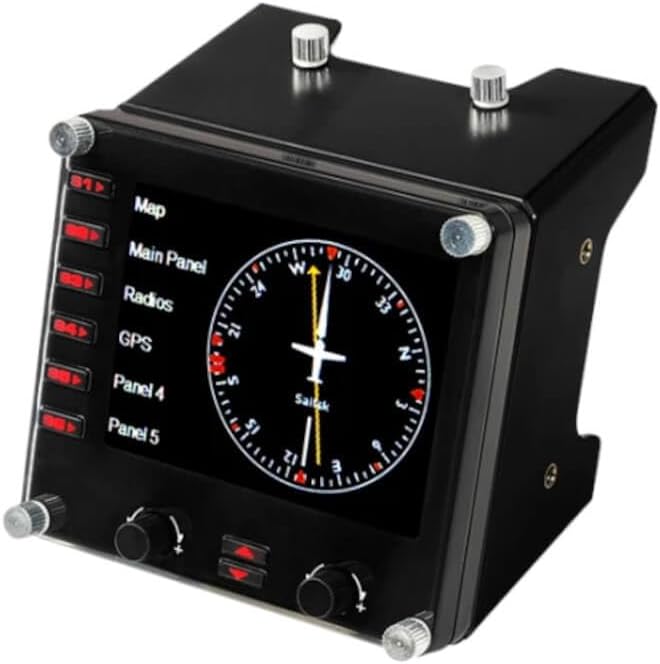
Realistic Display
The G Pro Flight Instrument Panel features an authentic LCD display that provides real-time readability for flight data, enhancing immersion and offering a genuine cockpit experience for flight simulation enthusiasts.
Modular Design
Easily add or customize your setup with a modular design that perfectly integrates with Logitech's range of flight simulation hardware, allowing users to create a tailored simulation environment that fits their needs.
Compatibility
Compatible with a variety of flight simulation software, this instrument panel delivers a seamless user experience across platforms, ensuring that dedicated pilots can integrate it effortlessly into their existing setups.
Détails du produit
| Compatible Devices | Windows 7, Windows 8.1, Windows 10, Windows 11 |
| Controller Type | Joystick |
| Connectivity Technology | USB |
| Additional Features | Motion Sensing |
| Button Quantity | 6 |
| Hardware Platform | PC |
| Power Source | Information Not Available |
| Item Weight | 14.11 ounces (400.02 grams) |
| Package Quantity | 1 |
| Item Dimensions | 5.71 x 4.65 x 3.94 inches (14.5 x 11.8 x 10 cm) |
| Color | Black |
| Brand Name | Logitech G |
| Model Name | Pro Flight |
| Manufacturer | Logitech, Inc |
| Global Trade Identification Number | 10097855127928 |
| Item Highlight | Colorful 3.5-inch LCD screen, 15 different readouts, realistic cockpit setups, mounting bracket included |
| UPC | 097855127921 |
| External Testing Certification | Não aplicável |
| Included Components | Mounting Bracket, Pro Flight Instrument Panel, QSG, Screws |
| Item Type Name | Logitech G Pro Flight Instrument Panel (945-000027) |
| Model Number | 945-000027 |
| Manufacturer Part Number | 945-000027 |
| Brand | Logitech G |
Contenu de la boîte
Pro Flight Instrument Panel
Mounting Bracket
Screws
QSG
À qui est-ce destiné ?

-
Flight Sim Enthusiasts
Ideal for dedicated flight simulation users who want a realistic cockpit experience with multiple instrument displays.
-
Training Pilots
Useful for trainee pilots needing to practice navigation skills and understand instrument readings in a simulated environment.
-
Multi-Display Setup
Perfect for users with multi-monitor setups, enhancing their simulation by providing additional instrument data at a glance.

-
Casual Gamers
Not suitable for occasional gamers who may not fully utilize all features of a professional flight instrument panel.
DESCRIPTION DU PRODUIT
Vous avez une question ? Chattez avec nous
Questions et réponses des clients
-
question:
What is the Logitech G USB Pro Flight Instrument Panel?
répondre: The Logitech G USB Pro Flight Instrument Panel is a versatile and easy-to-use cockpit instrument that enhances flight simulation experiences. It features a customizable LCD display that presents essential flight data, allowing pilots to monitor various performance metrics at a glance. With its plug-and-play functionality, it can be integrated seamlessly into most flight simulation software. This panel is ideal for enthusiasts and professional pilots alike, enhancing realism and providing a comprehensive view of important flight information during simulations. -
question:
How do I integrate the Logitech G USB Pro Flight Instrument Panel with flight simulator software?
répondre: Integrating the Logitech G USB Pro Flight Instrument Panel is straightforward. Simply connect it to your computer via a USB port, and most flight simulations, like Microsoft Flight Simulator or X-Plane, will recognize it automatically. You can customize the display settings through the simulation software or Logitech's G HUB software for tailored instrument readings. This functionality allows you to maximize your flight experience, giving you real-time data about altitude, speed, and navigation, making for a more immersive simulation. -
question:
Can I use multiple Logitech G USB Pro Flight Instrument Panels together?
répondre: Yes, you can connect multiple Logitech G USB Pro Flight Instrument Panels to your system, creating a comprehensive cockpit setup. This is especially beneficial for serious flight enthusiasts or professionals who want to simulate a full cockpit environment. By using multiple panels, you can monitor various instruments simultaneously, such as altitude, airspeed, or navigation readings, enhancing your operational efficiency and making your flight experience more engaging and realistic. -
question:
What types of display options does the Logitech G USB Pro Flight Instrument Panel offer?
répondre: The Logitech G USB Pro Flight Instrument Panel features a multi-function LCD that can display up to 15 different types of instrument readings. Users can customize the display for gauges like altitude, airspeed, heading, and more, allowing them to tailor the information to their specific flying needs. This flexibility ensures that whether you're flying commercial airliners or personal aircraft in simulation, you have the relevant data right in front of you for efficient monitoring and performance assessment. -
question:
Is the Logitech G USB Pro Flight Instrument Panel compatible with VR setups?
répondre: The Logitech G USB Pro Flight Instrument Panel can be used in conjunction with Virtual Reality (VR) setups, offering a tactile way to monitor flight data without taking your eyes off the simulated environment. While you'll need to ensure that your flight simulator supports both VR and the panel, this combination allows pilots to enjoy a truly immersive experience. This setup is perfect for those looking to elevate their flight simulation experience and manage cockpit instruments using real-world functionality. -
question:
What are the key features of the Logitech G USB Pro Flight Instrument Panel?
répondre: Key features of the Logitech G USB Pro Flight Instrument Panel include a high-resolution LCD display, multiple customizable instrument readings, and easy USB connectivity. It also includes buttons for direct adjustable settings and can function independently or as part of a multi-panel setup. These features are designed to enhance the realism and detail in flight simulations, making it a favorite among gamers and pilots seeking to replicate the cockpit experience as closely as possible. -
question:
Does the Logitech G USB Pro Flight Instrument Panel require additional software?
répondre: While the Logitech G USB Pro Flight Instrument Panel operates effectively with just a USB connection, using Logitech's G HUB software can enhance its functionality. The software allows you to customize the panel’s display and set up instruments according to your flight simulation needs. This customization can improve performance and realism in your flight experience, making it more tailored to your particular flying style and preferences in various simulation environments. -
question:
What should I consider when setting up the Logitech G USB Pro Flight Instrument Panel?
répondre: When setting up the Logitech G USB Pro Flight Instrument Panel, consider the available USB ports on your computer, as well as the specific flight simulator software you plan to use. Arrange the panel in a way that is ergonomic and easily viewable during your simulation sessions. Also, exploring the customization options through the G HUB software can significantly enhance your setup, providing you with real-time data tailored to your preferences, making it an integral part of your flight simulation setup. -
question:
How does the Logitech G USB Pro Flight Instrument Panel enhance flight simulation realism?
répondre: The Logitech G USB Pro Flight Instrument Panel enhances flight simulation realism by providing real-time, customizable data displays that mimic actual cockpit instruments. This level of detail helps pilots, whether virtual or real, to better interpret flight conditions and improve their situational awareness. Adding this panel to your setup allows for more effective monitoring of critical flight parameters, which is particularly useful during complex flight operations or simulations of challenging flight scenarios. -
question:
Where can I buy the Logitech G USB Pro Flight Instrument Panel?
répondre: You can purchase the Logitech G USB Pro Flight Instrument Panel from Ubuy in Mauritania. Ubuy offers a wide selection of Logitech products, ensuring that you get the instrument panel delivered conveniently to your location. As a trusted online retailer, Ubuy provides an efficient shopping experience for all your flight simulation needs.
Logitech G Flight Controls 945-000027 Editorial Review
Logitech G Pro Flight Instrument Panel is designed for flight simulation enthusiasts, featuring high-quality gauges and an easy installation process that quickly integrates with simulator software when paired with third-party drivers like SPAD.Next. Many users have attested to its solid build quality and responsiveness once correctly configured, although initial setup can be a hurdle for those unaware that standard drivers may not suffice on Windows 11. The panel accommodates a variety of flight simulation software and offers a responsive display, making it a valuable tool for players. Overall, while there are some concerns regarding driver support, it remains a favorite for enhancing flight simulation experiences.
Avis et évaluations clients
498 évaluations des clients
-
5 étoile
59%
-
4 étoile
16%
-
3 étoile
9%
-
2 étoile
4%
-
1 étoile
12%
Donnez votre avis sur ce produit
Partagez votre avis avec d'autres clients
Avantages
- Solid build quality for durability
- Wide range of gauges available
- Easy installation with the right software
- Excellent update rates with no visible lag
- Compatible with various simulator platforms
Les inconvénients
- Requires third-party software for optimal functionality
CONFIANCE EN LA PLATEFORME & PROTECTION DE L'ACHETEUR

JK
Jasmin
Acheteur vérifié
“Great products and very good service: very easy and very fast international delivery.”
9 September 2026 · via Trustpilot
AG
Anke
Acheteur vérifié
“Wonderful online shopping experience, smooth transaction from the start. Payment method works conveniently and delivery is unexpectedly fast and reliable. You go the extra mile for service. What makes this even more amazing, you deliver to Namibia. I will remain a happy Ubuy customer and will increase my purchases for sure! Thank you!”
10 September 2026 · via Trustpilot
H
Hazel
Acheteur vérifié
“Very easy to find the products what you need, and so fast delivery, that’s why I highly recommended to others costumers to used ubuy.”
10 September 2026 · via Trustpilot
O
Opaleye
Acheteur vérifié
“I received exactly what I ordered I was skeptical about your site because that was my first time to order. But the order came timely and neatly packaged. I was not disappointed. Thank you.”
11 September 2026 · via Trustpilot
AC
Adele
Acheteur vérifié
“Easy to find and order what you want on the website. Delivery is quick to the UK”
8 September 2026 · via Trustpilot
Paiement sécurisé
Global Delivery
Retours faciles
Genuine Products
Historique des prix du produit
Informations importantes
- Limitations : Pour les produits expédiés à l'international, veuillez noter que toute garantie du fabricant peut ne pas être valide ; les options de service du fabricant peuvent ne pas être disponibles ; les manuels, instructions et avertissements de sécurité des produits peuvent ne pas être dans les langues du pays de destination ; les produits (et les matériaux qui les accompagnent) peuvent ne pas être conçus conformément aux normes, spécifications et exigences d'étiquetage du pays de destination ; et les produits peuvent ne pas être conformes à la tension et aux autres normes électriques du pays de destination (nécessitant l'utilisation d'un adaptateur ou d'un convertisseur le cas échéant). Il incombe au destinataire de s'assurer que le produit peut être importé légalement dans le pays de destination. En cas de commande auprès d'Ubuy ou de ses filiales, le destinataire est l'importateur officiel et doit se conformer à toutes les lois et réglementations du pays de destination.
- Tous les produits listés sur Ubuy ne sont pas à vendre, Ubuy étant un moteur de recherche mondial. Les produits sont soumis aux réglementations en matière d'exportation et de commerce.
MUR 13041
Commandez maintenant et recevez votre commande aux alentours du Jeudi, Octobre 15
This item is not restrict in my country.(Please click on above link if this item is not restrict in your country, So our team will review and allow.)
QTY:
Il ne reste que 3 articles en stock.
Transaction sécurisée
Conforme PCI DSS et certifié ISO 27001:2022, avec des paiements chiffrés et une protection complète de l'acheteur pour chaque commande.
Nos meilleurs partenaires logistiques
Livraison transfrontalière la plus rapide
Caractéristiques et avantages
- Colorful 3.5-inch LCD screen
- Toggle between 15 different displays
- Real-time access to important aircraft information
- True multi-functional device
- Automatically updates and reacts to software events
- Displays real-time cockpit instrument information
Assurance Ubuy
Profitez d'une expérience d'achat sereine avec des produits 100 % originaux, une sécurité de paiement conforme PCI DSS, une protection des données certifiée ISO 27001, la livraison transfrontalière la plus rapide, les retours gratuits* et un emballage sécurisé pour chaque commande.